
RHEL 7.3 does not support UEFI?
I have a Dell T3420 with Windows 10 Pro on one hard drive. I added a second hard drive to the Dell, one that I had bought from Open World Computing. The hard-drive is recognized by Dell Support Assistant and Windows 10.
My goal is to install RHEL on this second hard-drive
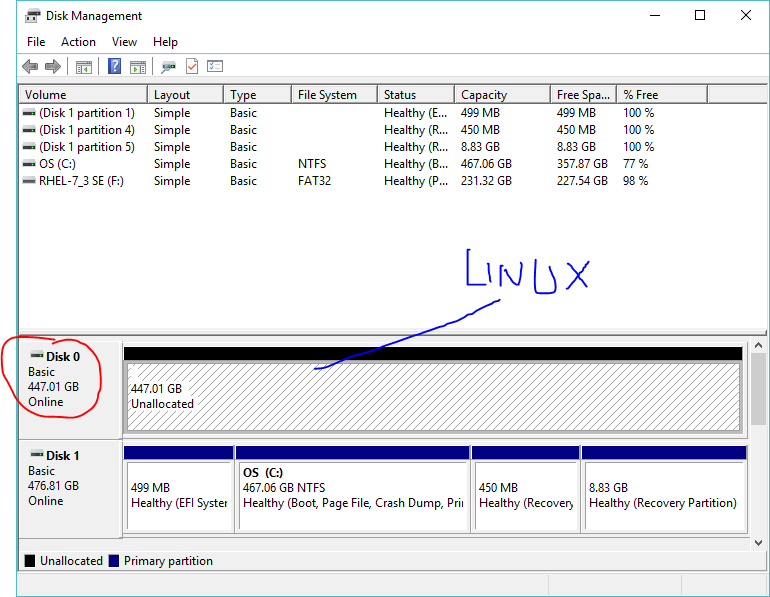
Please see attached pic from diskmgmt.msc.
I made sure both drives are non-RAID. The one which has Windows 10 Pro is a PCIE drive. The other drive on which I want to install RHEL is AHCI. I didn't format that volume.
So I created a bootable USB with the RHEL 7.3 download from Red Hat's Developer Site. I formatted the USB using Rufus. I chose formatting with GPT and UEFI from the drop down and picked up the RHEL ISO that I had downloaded from the Red Hat developer site.
The issue that I faced was when booting from the USB, the RHEL installer won't recognize my hard drives.
On the Installation Destination page, under Device Selection, I would only see the USB drive under Local Standard Disks.
I kept the UEFI and turned off Secure Boot , but that didn't solve the problem.
Finally, I disabled UEFI and Secure Boot, and chose Legacy Boot.
That also didn't solve the problem.
Then I went back to Rufus and chose MBR for UEBI and Bios as the partition.
I played with the Bios options on my Dell. Only when I had Legacy Boot option, the RHEL installer was able to recognize both hard drives drives. I saw both of these drives on the Installation Selection page.
I chose the one which does not have Windows 10 and was able to install RHEL (after a few tweaks with the partitions etc. in the RHEL installer wizard). No problems with this step.
I have two questions:
-
Why wasn't the RHEL installer on USB when formatted with GPT not able to see both of my internal hard drives?
-
After installation of RHEL, is there any way I can switch the Bios to Secure Boot and be able to boot either Windows 10 OR RHEL? I am suspecting this isn't possible because when I did re-enable Secure Boot, the only boot loader option I saw upon system startup was Windows 10.
Thanks in advance for your help,
Ray

Responses