
Inactive system policy for Red Hat Subscription Management (RHSM)
What’s changed and why?
Systems which are registered to Red Hat Subscription Management (via subscription.rhsm.redhat.com) historically have been dependent on users explicitly unregistering them in order to remove their data from Red Hat systems.
- We’ve found that these systems are generally unwanted, and lead to sub-optimal user experiences.
- Users frequently need to create their own scripts/processes to delete inactive systems.
- Reporting functions (such as errata reports or other user-generated reports) are often inaccurate as they include older systems that are no longer active.
- System registration performance is impacted negatively.
To better deliver a customer experience which accurately reflects actively managed systems, Red Hat has instituted an inactive system policy for Red Hat Subscription Management, which will
As of 01-May-2022, Red Hat introduced automation within Red Hat Subscription Management to delete systems which meet the following criteria:
-
In organizations with Simple Content Access enabled:
- Systems which have not checked in greater than 13 months (397 days).
-
In organizations with Simple Content Access disabled:
- Systems which have not checked in greater than 13 months (397 days). AND which do not have entitlements attached
As of 16-Jul-2025, Red Hat has updated this policy to delete systems which meet the following criteria:
-
In organizations with Simple Content Access enabled:
- Systems which have not checked in greater than 30 days.
-
In organizations with Simple Content Access disabled:
- Systems which have not checked in greater than 30 days. AND which do not have entitlements attached
These policies are ongoing, running daily
How do I?
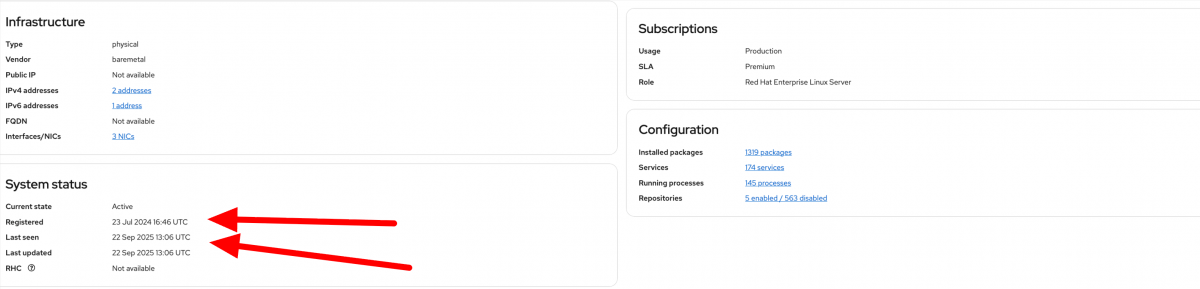
Q: Identify the last time my system has checked in?
A: Vist https://console.redhat.com/insights/inventory to view the list of systems that are connected to your account. On the System Status card, you can see the systems Registered and Last Seen times
Q: Connect a Red Hat Enterprise Linux system which has not been active?
A: Following the guidance in the Getting Started with RHEL system registration guide
FAQ
Q: Are Satellite manifests affected?
A: No.

Comments