
Migrating from CGroups V1 to CGroups V2 in Red Hat Enterprise Linux
Table of Contents
Overview
Control Groups (CGroups) provide methods for hierarchically managing resources within the system such as memory consumption, CPU time, block device bandwidth in read and write operations, etc. For example, a system could partition CPU execution time where 80% of all CPU execution time is spent on a database workload. Within this 80%, the CPU execution time can be further partitioned into 5% for logging operations and 75% for user queries. CGroups provides a great deal of useful features when the resource in question is shared across multiple workloads within the same system (such as backups being written to the same storage device as a production database or CPUs in any mixed workload).
Within the RHEL family, RHEL 6 introduced CGroups (now known as CGroups V1). Over time, the Linux community began CGroups V2 in an effort to improve upon the work accomplished by CGroups V1 and introduce a far more simple hierarchy and easier-to-use subsystem for managing resources hierarchically. RHEL 8 introduced CGroups V2.
For more information on CGroups, please refer to our blog post series on CGroups.
How to interact with CGroups V2 hierarchy
At a conceptual level, CGroups V1 mounted resource controllers and cgroups were created within the controller hierarchies. CGroups V2 instead creates the cgroups in question, then incorporates the desired controllers in question to the cgroups via the cgroup.subtree_control file. Essentially, CGroups V1 has cgroups associated with controllers whereas CGroups V2 has controllers associated with cgroups.
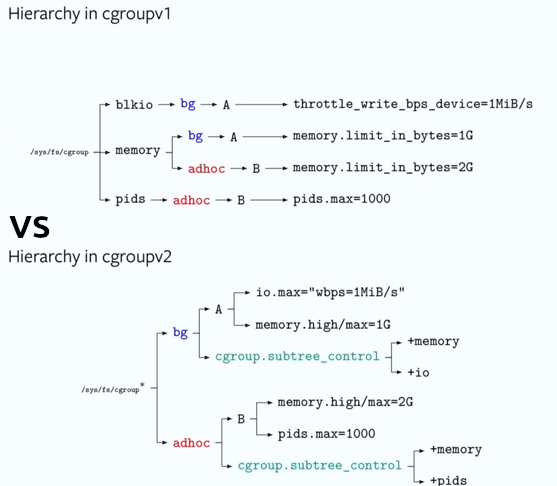
Above, the bg cgroup is associated with the blkio and memory cgroups in V1 but is a duplicated entry in the hierarchy since the bg cgroup is associated with multiple controllers. In V2, the bg cgroup exists once and has the memory and io controllers associated with it as described by cgroup.subtree_control.
Enabling CGroups V2 requires adding systemd.unified_cgroup_hierarchy=1 to the kernel parameters either temporarily by changing the kernel parameters on boot or permanently by updating the grub.cfg file. After booting with this parameter, systemd will then use CGroups V2 controllers and automatically mount the cgroup pseudofilesystem similar to its typical behavior with CGroups V1 when the parameter is not supplied. Here, a user can enter /sys/fs/cgroup/, create directories symbolizing cgroup creation, and modify parameters to the controllers by echoing values into the files automatically populated within the cgroup pseudofilesystem.
When CGroups V2 is enabled, the CGroups V1 controllers can still be mounted and used, but mixing CGroups V1 and V2 is not supported at this time. Furthermore, the use of CGroups V2 depends on the technology using it. Some that have added support during RHEL 8 are:
- RHEL 8.3 Release Notes
- Control Group v2 support for virtual machines - With this update, the libvirt suite supports control groups v2. As a result, virtual machines hosted on RHEL 8 can take advantage of resource control capabilities of control group v2. (JIRA:RHELPLAN-45920)
- Is rootless podman with cgroups v2 supported by Red Hat ?
- RHEL 8.5 podman - Red Hat supports cgroups v2 with
crunas container runtime from Red Hat Enterprise Linux 8.5
- RHEL 8.5 podman - Red Hat supports cgroups v2 with
How to migrate from CGroups V1 to CGroups V2
If the prior configurations with CGroups V1 in your environment worked with libcgroup-style configurations (e.g. cgconfig used /etc/cgconfig.conf to manage the cgroup hierarchy), then the services being managed from libcgroup will need to have systemd unit files written for them. Due to the varying range of complexity and requirements different workloads and application stacks require, best practices for creating a systemd unit file to configure service management via systemd should be done by the application vendor to ensure all requirements of the application stack are met. For additional assistance in creating unit files, refer to additional Knowledgebase articles or documentation.
Once a unit file exists for the relevant service, refer to systemd.resource-control(5) for the majority of the systemd directives which manipulate the limitations. Some key differences include:
- Cgroups CPU Set is replaced with CPUAffinity in systemd since RHEL 7 (refer to systemd-system.conf(5)).
- Note CPUAffinity uses the
sched_setaffinity(2)rather that CGroups cpuset
- Note CPUAffinity uses the
- CGroups V2 currently includes only the CPU, IO, Memory, and PID controllers.
Frequently Asked Questions (FAQ)
- Can I run a container made for a RHEL release prior to RHEL 8 on a RHEL 8 host?
- Yes. No changes are required to continue running a RHEL 7 CGroups V1 container on RHEL 8 as RHEL 8 still defaults to CGroups V1
- What controllers can I use in CGroups V2?
- Currently only four V2 controllers are explicitly present: CPU, IO, Memory, PIDs)
- How do I enable CGroups V2?
- While switching back and forth between V1 and V2 requires only mounting and unmounting the respective controllers, systemd requires one set to be mounted at the very least. As such, the only supported method of switching is to use the kernel boot parameter:
systemd.unified_cgroup_hierarchy=1
- Are CGroups V1 going away in future RHEL major versions? I see that
libcgroupis deprecated and on the list for removal. What other packages depend on it?- CGroups V1 will continue to be supported in RHEL 8 and 9 as the default CGroups to mount for backward compatibility reasons. CGroups V1 are not available in RHEL 10 anymore.
- What are the expectations and restrictions for Cgroup V1 and V2 being available on the same host at the same time?
- Having both V1 and V2 mounted concurrently is unsupported.
- I see that libcgroup is deprecated and on the list for removal.
- At this point, Red Hat strongly recommends to migrate from
libcgroupstyle CGroups to systemd style CGroups.
- At this point, Red Hat strongly recommends to migrate from

Comments