
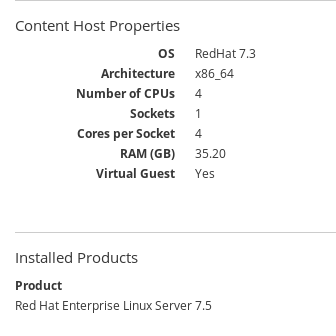
Client shows different Operating System versions under Content Host Properties and Installed Products on Red Hat Satellite GUI.
Issue
- A client registered to Red Hat Satellite shows different operating system versions on GUI in the following path.
- On
Red Hat SatelliteGUI -->Hosts-->Content Hosts--> selectContent Hosts-->Details--> underContent Host PropertiesandInstalled Products.
- On
Environment
- Red Hat Satellite 6
Subscriber exclusive content
A Red Hat subscription provides unlimited access to our knowledgebase, tools, and much more.
