
Setting up the AWS Config service for Cloudforms
Environment
- Red Hat Cloudforms 4.X
- Amazon EC2 Public Cloud
Issue
- The changes made at AWS side are not getting reflected immediately in cloudforms. Eg. I stopped the instance at AWS side but still its status show
as "Running" on the cloudforms dashboard. - How to subscribe cloudforms to AWS Config to get notifictions on the changes made in a AWS region through its SNS service.
- Why following warning message is repeated getting reported in the /var/www/miq/vmdb/log/aws.log file
[----] W, [2016-04-06T02:18:30.153315 #13096:11ef61c] WARN -- : MIQ(ManageIQ::Providers::Amazon::CloudManager::EventCatcher::Stream#find_or_create_queue) Unable to find the AWS Config Topic. Cannot collect Amazon events for AWS Access Key ID
Resolution
- Enable the AWS Config service in the AWS Management Console. See the AWS Config Developer Guide for more information.
- Create a new Amazon SNS topic named AWSConfig_topic. CloudForms automatically connects to this topic and start pulling the configuration changes.
Step by Step Procedure
AWS Side Configuration
- Start by choosing Config from the AWS console.
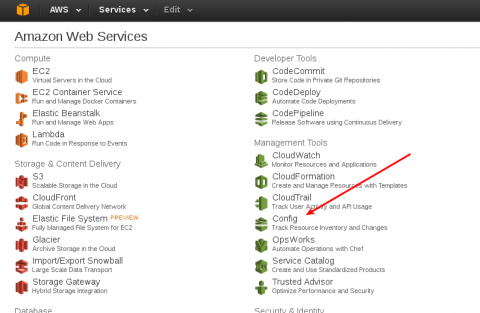
- On the Set up page, choose your options. If this is first time in you will need to create a new instead of choosing an existing. The name of the bucket is not important, the name of the topic must be AWSConfig_topic.

- After you save you can verify the SNS setup.

- Check the topic AWSConfig_topic.

- And verify there is data, although there is no further drill down of the data that can be visualized from here.
Cloudforms Side Configuration
- Make sure " Event Monitor " Role is enabled on your cloudforms appliance which is available under
Configure → Configuration → Server → Server Control

How to verify the cloudforms is successfully subscribed AWS SNS service and is pulling configuration changes details:
Look at the evm.log file to identity the successful subscription to AWSConfig from , Successful logs :
#grep -i sns /var/www/mig/vmdb/log/evm.log

[----] I, [2016-04-06T04:41:05.113170 #62385:c8d908]  INFO -- : MIQ(ManageIQ::Providers::Amazon::CloudManager::EventCatcher::Stream#parse_event) Found SNS Message with message type ConfigurationItemChangeNotification
[----] I, [2016-04-06T04:41:05.113628 #62385:c8d908]  INFO -- : MIQ(ManageIQ::Providers::Amazon::CloudManager::EventCatcher::Stream#parse_event) Parsed event from SNS Message AWS_EC2_Instance_stopped
[----] I, [2016-04-06T04:41:05.690410 #62385:c8d908]  INFO -- : MIQ(ManageIQ::Providers::Amazon::CloudManager::EventCatcher::Stream#parse_event) Found SNS Message with message type ConfigurationItemChangeNotification
[----] I, [2016-04-06T04:41:05.690945 #62385:c8d908]  INFO -- : MIQ(ManageIQ::Providers::Amazon::CloudManager::EventCatcher::Stream#parse_event) Parsed event from SNS Message AWS_EC2_NetworkInterface_UPDATE
The following changes are captured by cloudforms from AWSconfig
aws_ec2_instance_create
aws_ec2_instance_delete
aws_ec2_instance_running
aws_ec2_instance_shutting-down
aws_ec2_instance_stopped
aws_ec2_instance_update
Automate engine monitors these event at / ManageIQ / System / Event / EmsEvent / Amazon and when detected
does the evm refresh. This adds the liveness on cloudforsm dashboard. The changes made at amazon side get reflected
immediately .
How frequently cloudforms connects to AWSconfig for collecting changes.
by default every 15 seconds cloudforms connect to sns queue and look to see any message available , It stays connected for
5 seconds waiting to see message, if dont see anything drop and reconnect 15 seconds. If you want to make it even more
faster or slow it down. Go to configure - > configuration > server > advance and edit "EVM Server Main Configuration"
       :event_catcher_amazon:
        :poll: 15.seconds  < change this value
Root Cause
- Cloudforms was not subscribed to AWS:Config Service.
Diagnostic Steps
- Check the /var/www/miq/vmdb/log/aws.log file, Following Warning messages were repeatedly reported.
[----] W, [2016-04-06T02:18:30.153315 #13096:11ef61c]  WARN -- : MIQ(ManageIQ::Providers::Amazon::CloudManager::EventCatcher::Stream#find_or_create_queue) Unable to find the AWS Config Topic. Cannot collect Amazon events for AWS Access Key ID

and these logs when debug logging is enabled

[----] D, [2016-04-06T02:27:43.132242 #13096:1121050] DEBUG -- : MIQ(ManageIQ::Providers::Amazon::CloudManager::EventCatcher::Stream#find_or_create_queue) Looking for Amazon SQS Queue manageiq-awsconfig-queue-fb4e3f1a-f81d-11e5-bfd9-00163e7402c4 ...

[----] D, [2016-04-06T02:27:43.917519 #13096:1121050] DEBUG -- : [AWS SQS 400 0.782813 0 retries] get_queue_url(:queue_name=>"manageiq-awsconfig-queue-fb4e3f1a-f81d-11e5-bfd9-00163e7402c4") AWS::SQS::Errors::NonExistentQueue The specified queue does not exist for this wsdl version.
This solution is part of Red Hat’s fast-track publication program, providing a huge library of solutions that Red Hat engineers have created while supporting our customers. To give you the knowledge you need the instant it becomes available, these articles may be presented in a raw and unedited form.

Comments