
Using Azure File CSI with NFS in Azure Red Hat OpenShift
Environment
- Azure Red Hat OpenShift (ARO)
Issue
- Guidance on how to set up and use the Azure File Container Storage Interface (CSI) with Network File System (NFS) in an Azure Red Hat OpenShift environment.
Resolution
This guide provides step-by-step instructions on how to configure and deploy Azure File CSI with NFS on Azure Red Hat OpenShift.
1. Set Resource Group Permissions
Set the necessary permissions for your resource group and verify the service principal permissions.
# Replace the values of variables with your specific information
ARO_RESOURCE_GROUP=<your-resource-group-name>
AZURE_FILES_RESOURCE_GROUP=<your-files-resource-group-name>
CLUSTER=<your-cluster-name>
SUBSCRIPTION_ID=<your-subscription-id>

ARO_SERVICE_PRINCIPAL_ID=$(az aro show -g $ARO_RESOURCE_GROUP -n $CLUSTER --query servicePrincipalProfile.clientId -o tsv)

az role assignment create --role Contributor --scope /subscriptions/$SUBSCRIPTION_ID/resourceGroups/$AZURE_FILES_RESOURCE_GROUP --assignee $ARO_SERVICE_PRINCIPAL_ID
2. Create a Premium Azure Storage Account
Create a Premium_LRS or Premium_ZRS Azure storage account to support NFS. Set up with the required specifications:
- Account Kind:
FileStorage - Require secure transfer for REST API operations:
Disabled - Allow access from the virtual network.
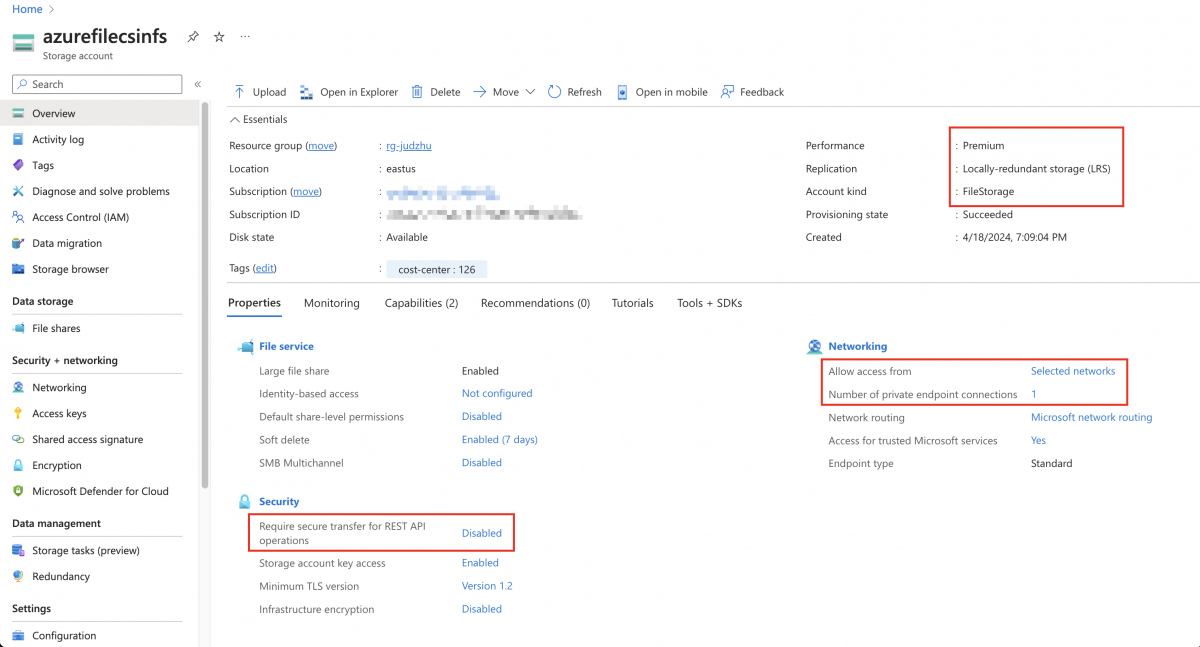
3. Create the Storage Class
Use the following command to create a Storage Class in your ARO cluster that uses Azure File CSI with NFS:
cat <<EOF | oc apply -f -
apiVersion: storage.k8s.io/v1
kind: StorageClass
metadata:
  name: azurefile-csi-nfs
provisioner: file.csi.azure.com
parameters:
  protocol: nfs
  skuName: Premium_LRS
  resourceGroup: <your-resource-group>
  storageAccount: <your-storage-account-name>
reclaimPolicy: Delete
volumeBindingMode: Immediate
allowVolumeExpansion: true
mountOptions:
  - nconnect=4
  - noresvport
  - actimeo=30
EOF
Note: Replace <your-resource-group> and <your-storage-account-name> with your specific Azure details.
[Optional] 4. Deploy Test Application
Deploy an application to test the NFS volume.
cat <<EOF | oc apply -f -
apiVersion: v1
kind: PersistentVolumeClaim
metadata:
  name: example-pvc
spec:
  storageClassName: azurefile-csi-nfs
  accessModes:
    - ReadWriteOnce
  resources:
    requests:
      storage: 1Gi
---
apiVersion: v1
kind: Pod
metadata:
  name: example-pod
spec:
  containers:
  - name: example-container
    image: nginx
    volumeMounts:
    - name: storage
      mountPath: /tmp
  volumes:
  - name: storage
    persistentVolumeClaim:
      claimName: example-pvc
EOF
5. Verification
Verify that the pod and PVC are working as expected.
$ oc get pod
NAME          READY   STATUS    RESTARTS   AGE
example-pod   1/1     Running   0          4m54s

$ oc get pvc
NAME          STATUS   VOLUME                                     CAPACITY   ACCESS MODES   STORAGECLASS        AGE
example-pvc   Bound    pvc-1e1267fe-b57f-4291-bf44-7f109d6bb756   1Gi        RWO            azurefile-csi-nfs   5m4s

$ oc exec -it example-pod bash
kubectl exec [POD] [COMMAND] is DEPRECATED and will be removed in a future version. Use kubectl exec [POD] -- [COMMAND] instead.
root@example-pod:/# df -h
Filesystem                                                                                        Size  Used Avail Use% Mounted on
overlay                                                                                           128G  8.7G  119G   7% /
tmpfs                                                                                              64M     0   64M   0% /dev
tmpfs                                                                                             7.9G     0  7.9G   0% /sys/fs/cgroup
shm                                                                                                64M     0   64M   0% /dev/shm
tmpfs                                                                                             3.2G   61M  3.1G   2% /etc/hostname
azurefilecsinfs.file.core.windows.net:/azurefilecsinfs/pvcn-1e1267fe-b57f-4291-bf44-7f109d6bb756  100G     0  100G   0% /tmp
/dev/sda4                                                                                         128G  8.7G  119G   7% /etc/hosts
tmpfs                                                                                              13G   24K   13G   1% /run/secrets/kubernetes.io/serviceaccount
tmpfs                                                                                             7.9G     0  7.9G   0% /proc/acpi
tmpfs                                                                                             7.9G     0  7.9G   0% /proc/scsi
tmpfs                                                                                             7.9G     0  7.9G   0% /sys/firmware

root@example-pod:/# mount | grep nfs
azurefilecsinfs.file.core.windows.net:/azurefilecsinfs/pvcn-1e1267fe-b57f-4291-bf44-7f109d6bb756 on /tmp type nfs4 (rw,relatime,vers=4.1,rsize=1048576,wsize=1048576,namlen=255,acregmin=30,acregmax=30,acdirmax=30,hard,noresvport,proto=tcp,nconnect=4,timeo=600,retrans=2,sec=sys,clientaddr=10.0.1.7,local_lock=none,addr=20.60.61.136)
Diagnostic Steps
References
This solution is part of Red Hat’s fast-track publication program, providing a huge library of solutions that Red Hat engineers have created while supporting our customers. To give you the knowledge you need the instant it becomes available, these articles may be presented in a raw and unedited form.

Comments